
Essential Eight vs CyberCert SMB1001: Which Cybersecurity Framework is Right for Your Business?

In today’s digital-first economy, cybersecurity is no longer optional—it’s a business imperative. For Australian organisations, two frameworks often dominate the conversation: Essential Eight and CyberCert SMB1001. Both aim to strengthen cyber resilience, but they differ in scope, complexity, and suitability for different business types.

This article explores the key differences between Essential Eight and CyberCert SMB1001, and helps you decide which framework is right for your organisation.


What is the Essential Eight?

The Essential Eight is a set of eight prioritised mitigation strategies developed by the Australian Cyber Security Centre (ACSC). It’s designed to protect organisations against common cyber threats targeting internet-connected IT networks. The eight strategies include:

  1. Application Control
  2. Patch Applications
  3. Patch Operating Systems
  4. Restrict Administrative Privileges
  5. Restrict Microsoft Office Macros
  6. User Application Hardening
  7. Multi-Factor Authentication (MFA)
  8. Regular Backups

The framework uses a Maturity Model ranging from Level Zero (no implementation) to Level Three (highly restrictive). Most businesses aim for Level 1 or 2, as Level 3 can be challenging for organisations with complex third-party applications.

Why Essential Eight Matters

  • Reduces risk of compromise by addressing common attack vectors.
  • Supports compliance with government and industry requirements.
  • Protects reputation and customer trust.

However, implementing Essential Eight can be resource-intensive. It often requires enterprise-grade licences (e.g., Microsoft 365 E5), advanced security tools, and ongoing monitoring—making it more suitable for larger organisations.


What is CyberCert SMB1001?

CyberCert SMB1001 is a certification standard tailored for small and medium-sized businesses (SMBs). It provides a structured, proportionate set of controls aligned with Australia’s Cyber Security Strategy and insurer expectations. The latest version, SMB1001:2026, includes:

  • Email Security Enhancements (DMARC, SPF, DKIM)
  • Advanced Detection & Response capabilities
  • AI Policy Requirements for safe use of AI tools

Unlike Essential Eight, SMB1001 offers formal certification, giving SMBs a recognised cybersecurity posture. This is particularly valuable for businesses seeking to:

  • Build trust with clients and stakeholders
  • Strengthen their position with insurers
  • Demonstrate compliance with national standards

Visual Comparison Chart

AspectEssential EightCyberCert SMB1001
OriginACSC / ASD (Government-backed)CyberCert (Industry-driven)
FocusTechnical controls for IT networksSMB-focused compliance and resilience
Structure8 mitigation strategies + Maturity ModelCertification standard with practical toolkits
ComplexityHigh—requires deep technical implementationModerate—designed for SMB resource constraints
CertificationNo formal certificationYes—formal certification available
Best ForMedium to large organisations, regulated industriesSmall to medium businesses seeking compliance

Which Framework Suits Your Business?

Essential Eight: Best for Larger or Regulated Organisations

Ideal for sectors like government, finance, healthcare, or legal, where compliance is critical. Be prepared for:

  • Higher costs (e.g., Microsoft 365 E5 upgrades)
  • Longer implementation timelines

CyberCert SMB1001: Perfect for SMBs

Designed for businesses that:

  • Want a clear, guided path to compliance
  • Need to prove cybersecurity maturity to clients or insurers
  • Operate with limited IT resources

Can You Combine Both?

Yes. Many businesses use SMB1001 as a stepping stone toward Essential Eight maturity. Certification establishes a baseline, while Essential Eight offers a more comprehensive technical defence for organisations ready to invest further.


Ready to strengthen your cybersecurity posture?

Whether you’re a business that works with any level of government or a small-to-medium business looking to shore up your cybersecurity compliance, now is the time to act.

Start with CyberCert SMB1001 for a practical, certifiable approach.
Plan for Essential Eight to meet advanced compliance requirements.

Contact us today to learn how we can help you implement the right framework for your business and protect your organisation against evolving cyber threats.
NBN HFC NTD

NBN moving to Self Install for HFC connections

From the 1st of July 2017, nbnCotm have made changes to their installation policy for nbntm Hybrid Fibre Coaxial (HFC) cable connections, notably introducing Self Install for HFC connections.

These changes affect customers who have previously had a Telstra® or Foxtel® cable service installed at their premises, the cable from the utility pole to the wall plate is to known to be in good working condition and is connected to a wall-plate with the customer’s premises (otherwise known as Service Class 23).

Self Install for HFC connections

If this best describes your premise, then it’s likely this change affects you. But it’s not all bad!

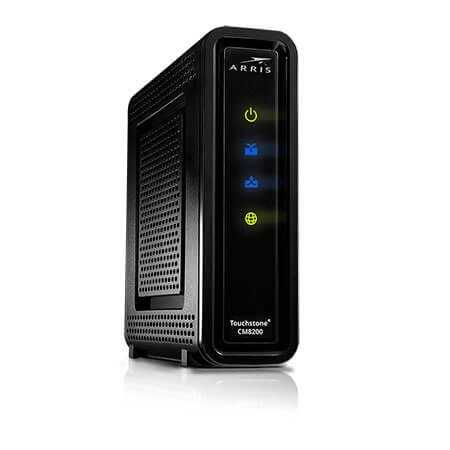
Essentially, if you are one of these customers, nbntm’s policy is to now send the nbntm equipment, known as a Network Termination Unit (NTU) directly to the customer for Self-Installation, rather than sending out an nbntm installer to connect the NTU to the wall plate. These NTU’s are essentially cable modems (pictured right), which are relatively easy to install.


Why did nbncotm make the change?

There are plenty of reasons why nbntm might have made the change, but we don’t see it as a bad thing for customers; in fact quite the opposite.

While the downside is that you’ll have to install the NTU yourself, which isn’t that difficult, the change should result in customers getting connected to the nbntm in a quicker time frame as they don’t need to schedule a site visit from an nbntm installer, which can cause delays in areas where there is a limited installer work-force, or there is a back log of installations.


Can I request an nbntm installer to come out an install the NTU for me?

Yes, you can. However, there is a fee attached to this. As at July 2017, the fee was $300 which is billed to you through your broadband provider. Needless to say, the Self Install for HFC connections option is a far cheaper than a professional installation

Needless to say, the Self Install for HFC connections option is a far cheaper than a professional installation.


What alternatives do I have?

If you’re located in Melbourne, innoTel can perform the installation for you at no cost, which includes setting up your modem/router and connecting it to your network. If you’re not located in Melbourne, we can arrange for one of our contractors to visit you on-site and install the nbntm hardware, which does incur a charge.

If you have an I.T. person that looks after your network, they may be able to assist.

However, it’s really not that difficult to do and it’s as easy as plugging in a broadband modem, which you may have done a few times before. If you’re keen to give it a go, check out our nbntm HFC Self Install Guide which walks you through the Self Install for HFC connections process.

Looking for a small business NBN provider? Speak to us today!


nbntm, Telstra® or Foxtel® are registered trademarks of their respective owners.

35 new areas to be disconnected in February (NBN)

NBNCo have been busy over the last few years rolling out the new Broadband network and the time has come for more areas to under-go the mandatory copper disconnection, which occurs approximately 18-months after the network is completed in an area.

The February 2017 list of areas appears to be the largest under-go copper disconnection so far with over 30 areas across Australia to have their old services disconnected. Once again, we’re seeing a high number of business premises in these roll-out areas. Most areas will be disconnected on the 10th of February, while a small number will be disconnected on the 24th of February.

Have you organised to switch to the NBN yet? If you’re a business and you haven’t yet made the switch, time is running out. There’s a lot more to take into account with a business and can take longer to sort through your options and organise. Luckily for you, innoTel are the NBN experts when it comes to businesses and can walk you through the process and provide you with great business NBN services.

NBN FTTP (Fibre to the Premise) services have replaced existing phone and broadband services in these areas, offering super-fast speeds of up-to 100Mbps download and 40Mbps upload. innoTel  as a range of NBN business broadband plans.

The following areas, or parts of, will have their existing copper-based phone and broadband services disconnected (disconnected date in brackets);

  • Liverpool NSW (10/02/2017)
  • Riverstone, Schofields, Marsden Park NSW (10/02/2017)
  • Brinkin, Casuarina, Jingili, Nakara, Alawa NT (10/02/2017)
  • Bundamba, Dinmore, Ebbw Vale, New Chum, Blackstone QLD (10/02/2017)
  • Collingwood Park, Redbank QLD (10/02/2017)
  • Manunda, Cairns North QLD (10/02/2017)
  • Redbank Plains QLD (10/02/2017)
  • Sunnybank Hills, Willawong, Algester QLD (10/02/2017)
  • Para Hills, Ingle Farm SA (10/02/2017)
  • Prospect, Dudley Park SA (10/02/2017)
  • Valley View SA (10/02/2017)
  • Victor Harbor SA (10/02/2017)
  • Howrah, Bellerive TAS (10/02/2017)
  • Huntingfield, Kingston TAS (10/02/2017)
  • Brunswick VIC (10/02/2017)
  • Cranbourne VIC (10/02/2017)
  • Cranbourne West VIC (10/02/2017)
  • Gladstone Park VIC (10/02/2017)
  • Seddon, Kingsville VIC (10/02/2017)
  • Shepparton, Shepparton East, Orrvale VIC (10/02/2017)
  • Ravenswood WA (10/02/2017)
  • South Perth WA (10/02/2017)
  • Queanbeyan East, The Ridgeway, Greenleigh ACT (24/02/2017)
  • Campbelltown, Bradbury NSW (24/02/2017)
  • Mangerton, Mount Saint Thomas, Coniston NSW (24/02/2017)
  • Townsville (parts) QLD (24/02/2017)
  • Medindie Gardens, Nailsworth, Vale Park, Walkerville, Collinswood SA (24/02/2017)
  • Victor Harbor, Encounter Bay SA (24/02/2017)
  • Trevallyn, Riverside TAS (24/02/2017)
  • West Footscray, Tottenham VIC (24/02/2017)

Not all premises in these areas will be disconnected, so you should check to see if you are affected. The check if you’re located in one of these areas, check your address using our NBN Rollout Map.

If you are located in one of these areas, it’s worth getting your connection to the NBN sorted as soon as possible.  innoTel can help you make the transition to the NBN in time and smoothly, with no down-time for your business. Get in contact with us to find out how.